Usage Instructions: This FAQ can help you quickly identify print quality issues based on the Test Print and provides simple troubleshooting steps.
If basic troubleshooting does not resolve the issue, please refer to the complete troubleshooting articles linked, or contact eufyMake@support.com and describe the steps you have already taken.
¶ Q1: No Ink Output: A specific color is completely missing on the Test Print. What should I do?
How to identify: Run a print test and check the 6 color chanels (C/M/Y/K/W/G). If a color chanel is completely blank, this indicates No Ink Output.
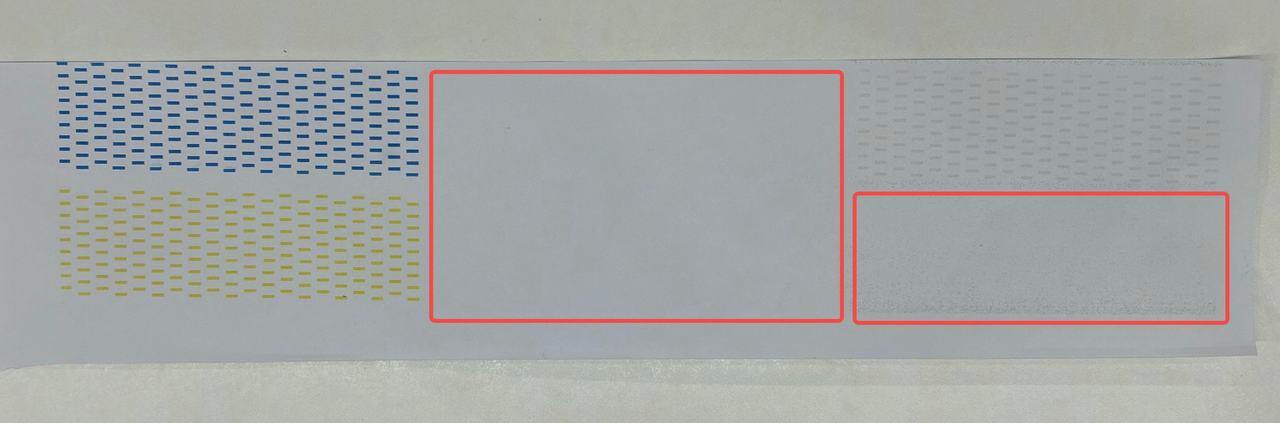
Basic troubleshooting steps:
- Confirm whether the UV Ink Cartridge for that color still has ink (shake the cartridge and compare with the ink level displayed in the software)
- Confirm whether the UV Ink Cartridge is properly installed and the green LED is on
- Perform 1-2 Factory Resets (select "Remove and Reset Device" in the APP)
- If there is still No Ink Output → replace the corresponding color UV Ink Cartridge + 1 Factory Reset
Note: When encountering No Ink Output, do NOT repeatedly try cleaning. Check ink levels first, then perform a Factory Reset. Otherwise, ink will be wasted.
See More>> https://wiki.eufymake.com/en/Troubleshooting/No-Ink-Output-or-Severe-Banding
¶ Q2: Line Break: There are broken/missing lines on the Test Print . Is this normal?
How to identify: Print a Test Print and observe whether horizontal lines within each color are missing or broken.
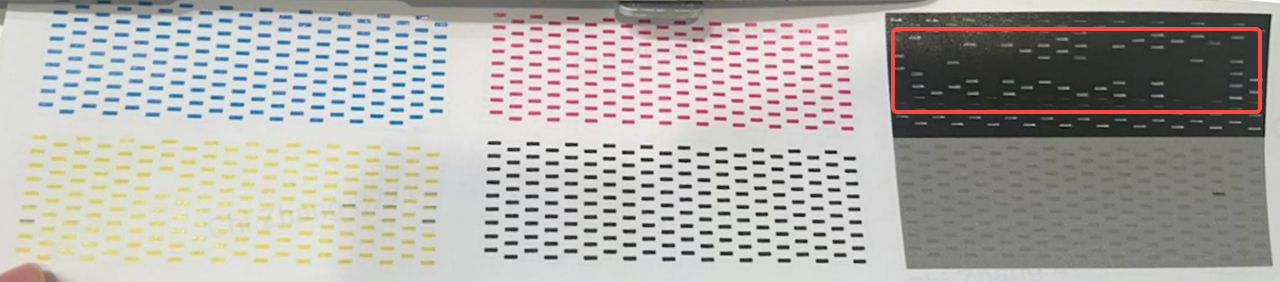
Line Break threshold:
Normal range (does not affect print quality): Total non-consecutive line breaks across all 6 colors ≤ 15, and single-color non-consecutive line breaks ≤ 5, and no recurring line breaks at fixed positions
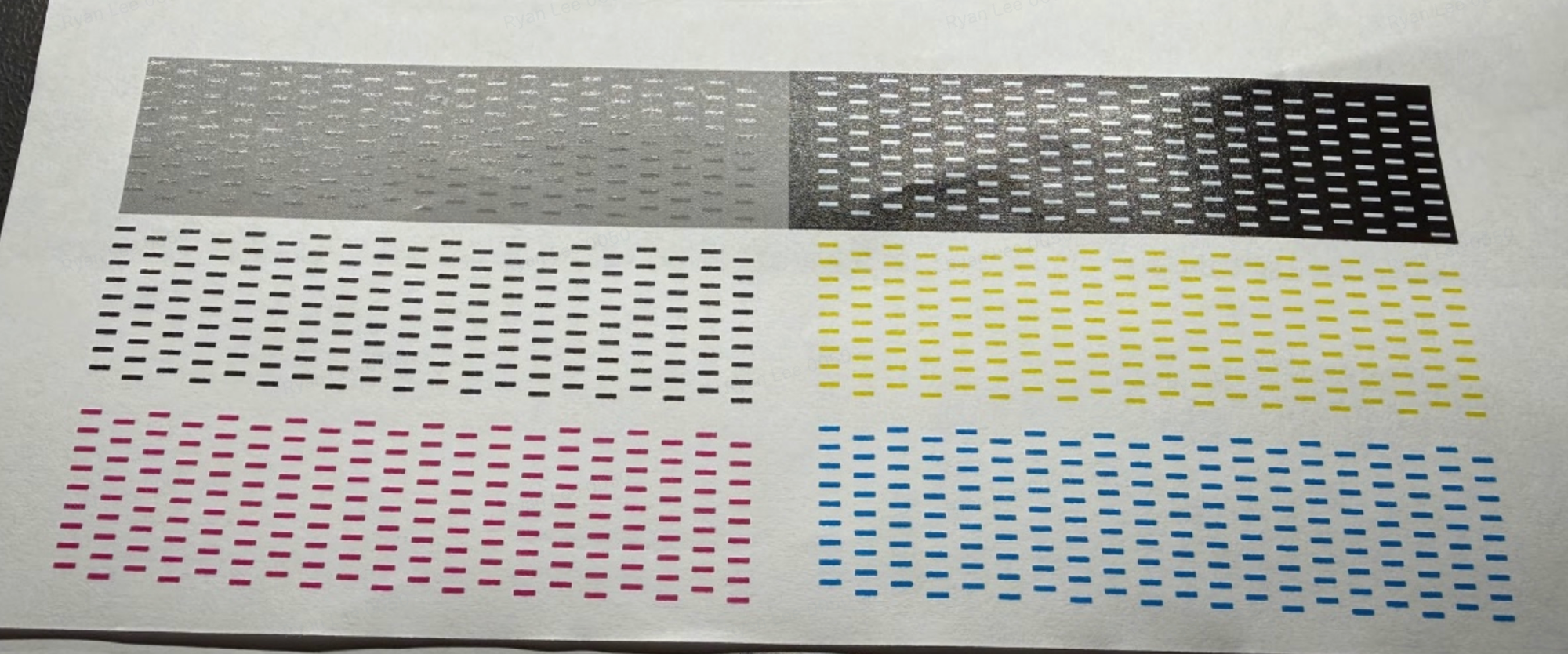
Requires action (Line Break): Total non-consecutive line breaks across all six colors > 15; or single-color non-consecutive line breaks > 5; or recurring line breaks at the same position
Basic troubleshooting steps:
- Check whether the Print Head metal surface has ink, foreign matter, or scratch marks
- If yes → clean the Print Head and Ink Stack following the cleaning and maintenance guide
- If no → run 2 Deep Cleaning cycles + 1 Medium Cleaning cycle, then print a Test Print
¶ Q3: White Ink fading: White prints appear insufficiently white / grayish. How to resolve?
How to identify: When printing white patterns or white blocks, the white color appears noticeably faded, grayish, or translucent.
- Basic troubleshooting steps:
- Print a Test Print to check the White Ink status
- Print a white block to verify: White mode → 10 layers of White Ink → 300x70mm → print the block
- If the white color returns to normal → continue monitoring
- If still not restored: Replace the W UV Ink Cartridge and print a Test Print again
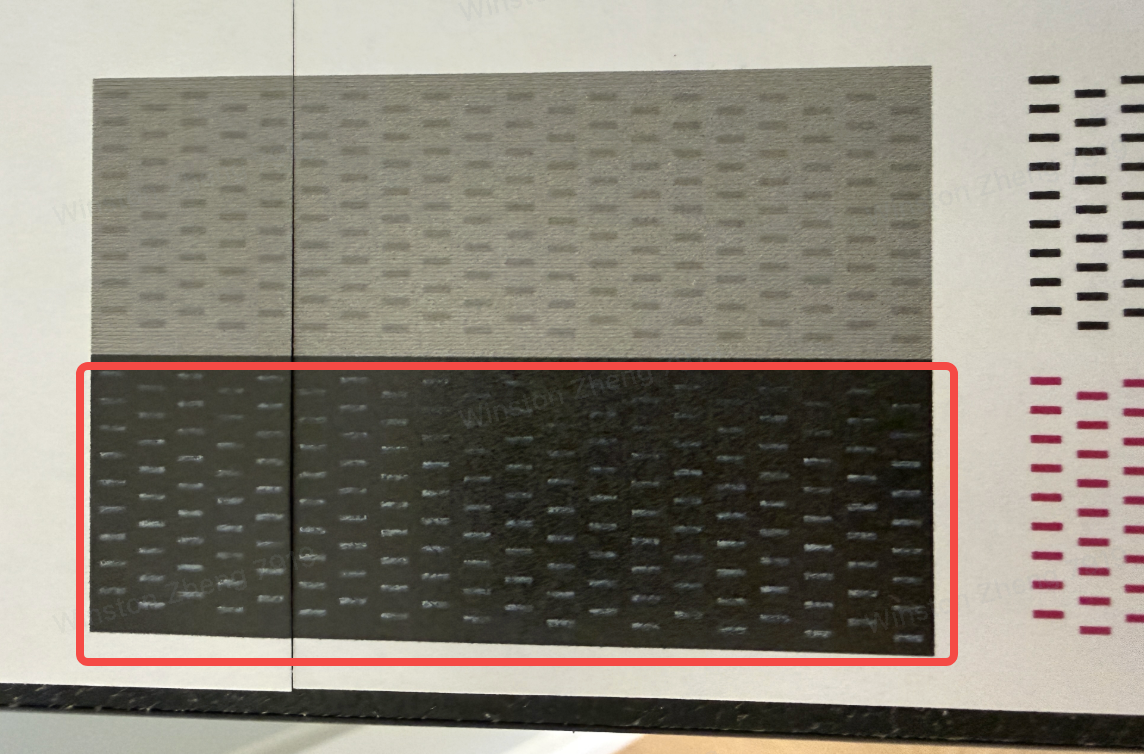
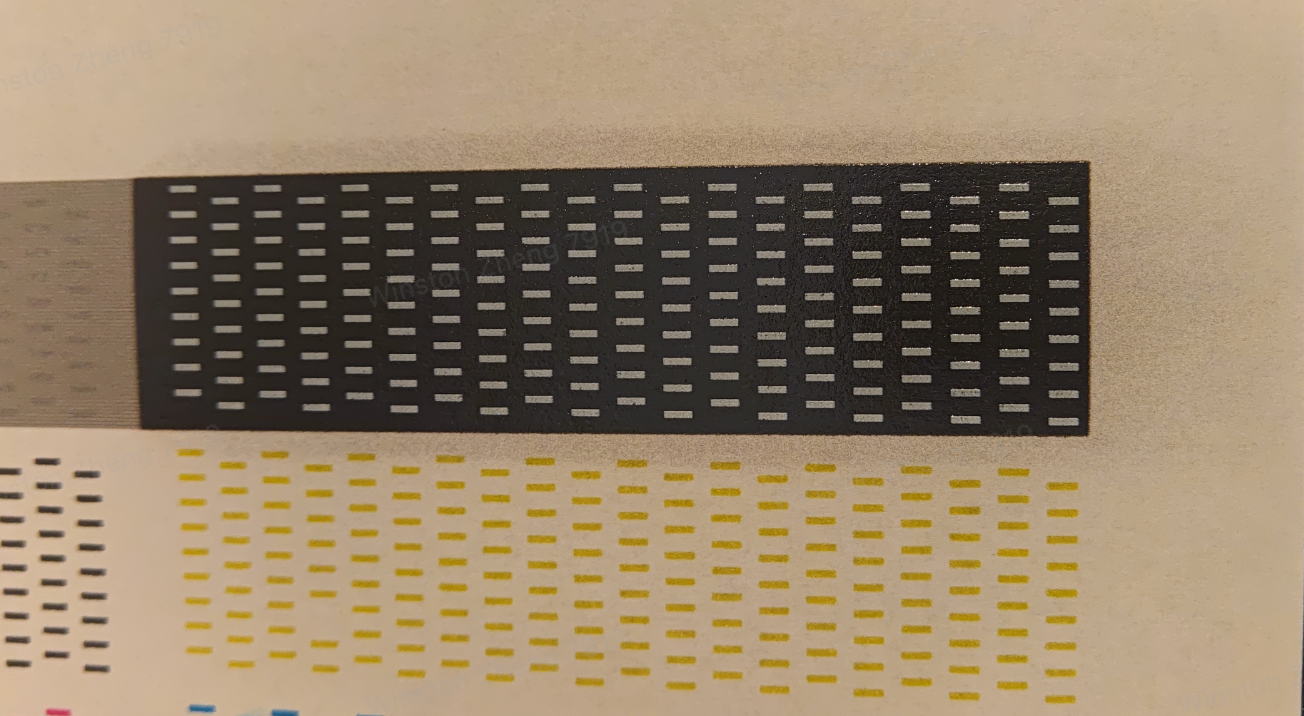
¶ Q4: Ink Bleeding: Print edges are blurry / have ink splatter / ghosting. What causes this?
How to identify: Printed edges show ink splatter, ghosting, or blurriness. Pay special attention to text or fine line edges.
Basic troubleshooting steps:
- Print a Test Print to confirm the scope of the issue
- Check Substrate placement:
- Is the Substrate flat and firmly adhered to the Flatbed? Is the height difference between the software measurement and the actual print height greater than 2mm?
- Is the Substrate warped? Is there any obstruction from the baffle?
- Check the environment: Is there direct airflow from air conditioning / fans / open doors or windows? (Airflow can cause Ink Bleeding)
- Run Medium Cleaning, then print a Test Print
- Try testing with an official Substrate (refrigerator magnet). If the refrigerator magnet also shows bleeding → contact customer support
See More>> https://wiki.eufymake.com/en/Troubleshooting/ink-bleeding
¶ Q5: Color Shift: Print colors appear reddish / greenish / bluish / yellowish. How to troubleshoot?
How to identify: The overall printed image has a color cast that is noticeably different from the on-screen display.
Basic troubleshooting steps:
- Print a Test Print to see if there are Line Breaks or No Ink Output
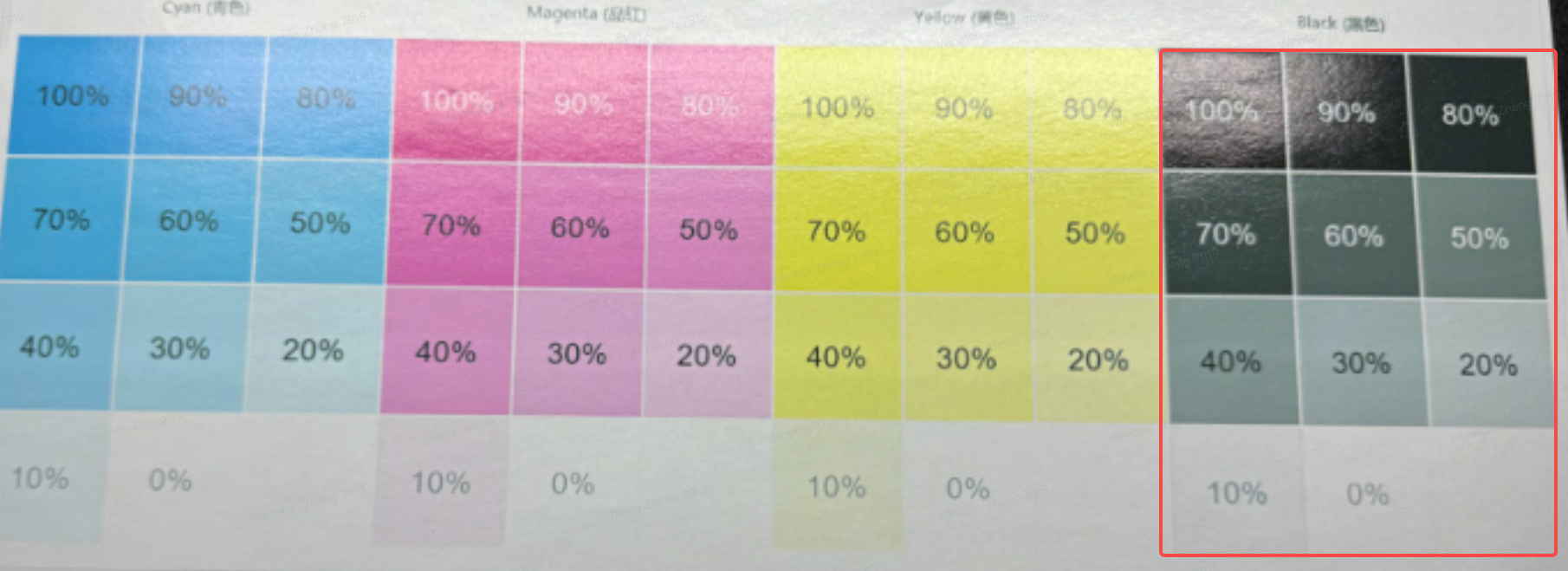
- If the Test Print looks normal → print a CMYK color block test chart, focusing on the black blocks, the colors from dark to light represent the ink output from large ink droplets to small ink droplets:
- Black small droplet areas appear greenish → missing M (Magenta Print Head small droplet issue)
- Black small droplet areas appear reddish → missing C (Cyan Print Head small droplet issue)
- Black small droplet areas appear bluish → missing Y (Yellow Print Head small droplet issue)
- If any abnormality is found, refer to Q2 Line Break troubleshooting steps
- If both the Test Print and CMYK chart look normal but color cast persists → check the ink level / ink shelf life of the affected UV Ink Cartridge, replace the cartridge, and print a test again
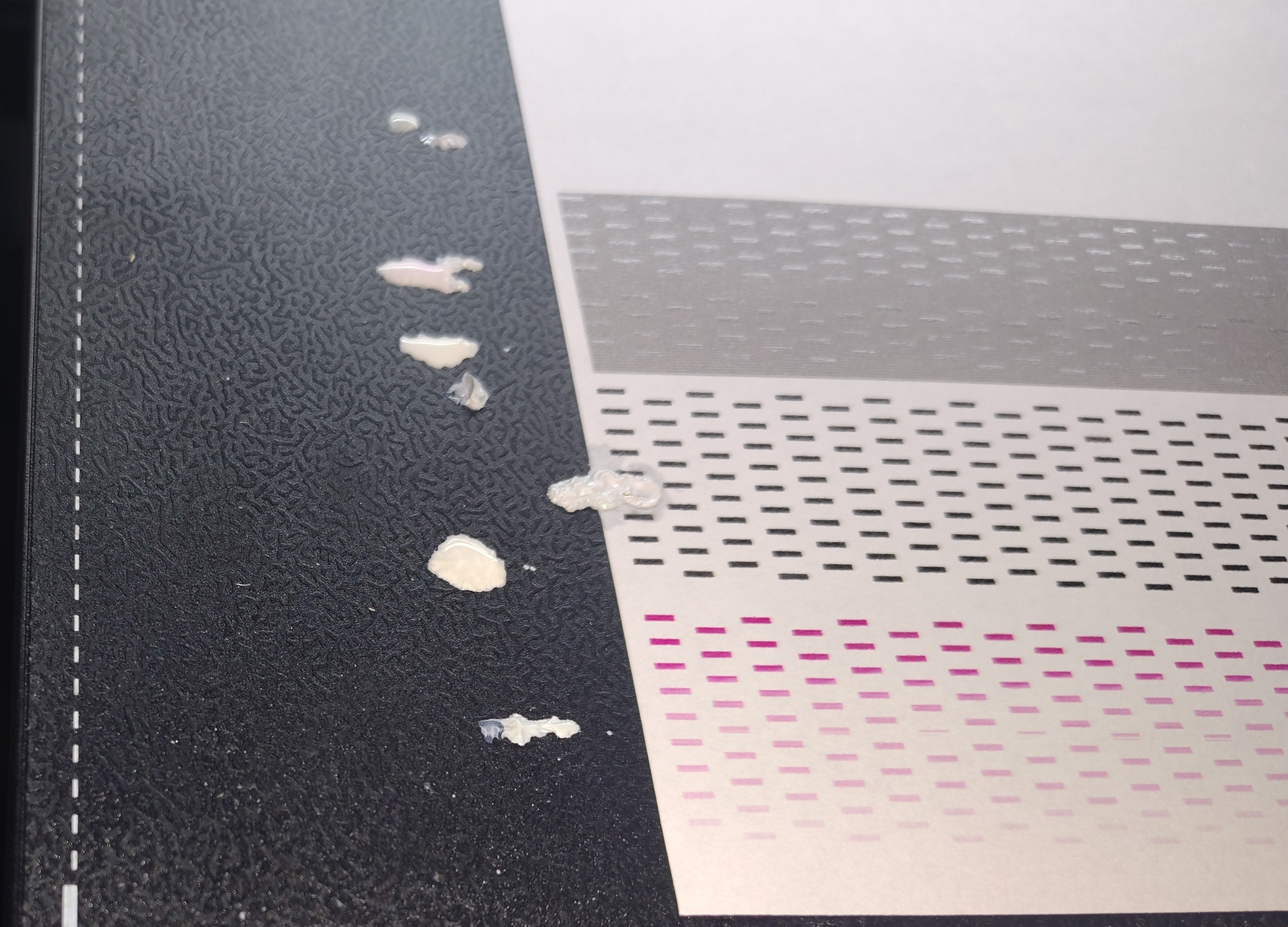
¶ Q6: There are ink droplets / splash marks on the print (Ink Dripping). How to resolve?
How to identify: Unexpected ink droplets, dots, or splash marks appear on the printed surface.
Basic troubleshooting steps:
- Check the Substrate: Is it warped? Is there foreign matter on the Flatbed? Is the Substrate placed unevenly? → Reposition
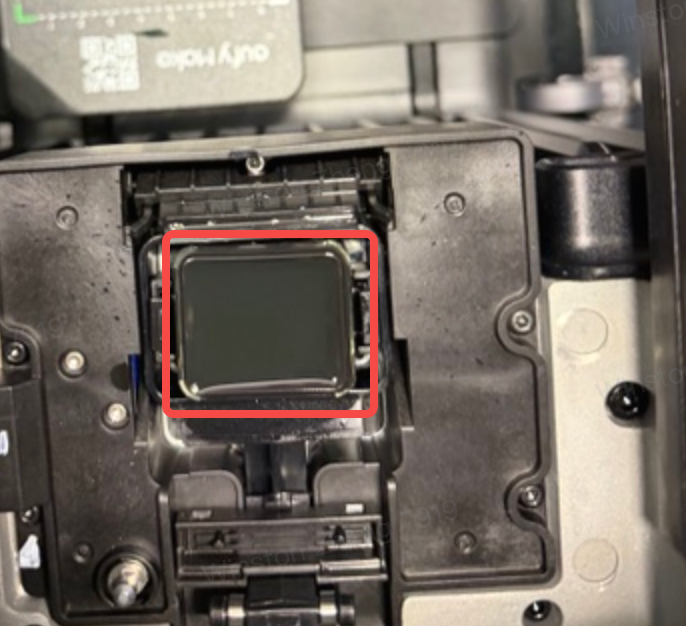
- Check whether the Print Head is being scraped (Substrate hitting the Print Head causing Ink Dripping)
- Move the Print Head out, wipe the Print Head metal surface with a Lint-Free Cloth, and observe the ink color:
- White or other solid color → Ink Dripping from the Print Head itself (Ink Damper issue), contact customer support
- Black (Waste Ink color) → check for fluid buildup in the Ink Stack and contact customer support
- If you have spare UV Ink Cartridges, swap cartridges for cross-validation
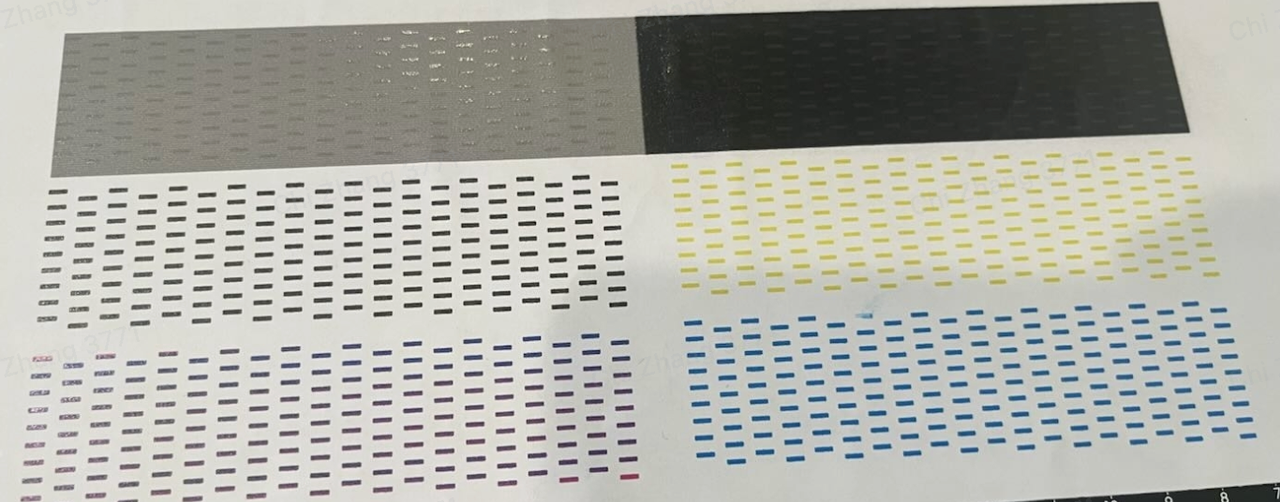
¶ Q7: Color Mixing: Colors are mixing / bleeding into each other . How to resolve?
How to identify: Boundaries between different colors in the print are blurred, colors permeate into each other, or appear mixed.
Basic troubleshooting steps:
- Confirm whether it is single-color mixing or multi-color mixing
- Single-color mixing: Run 3 Medium Cleaning cycles
- Multi-color mixing:
- With fluid buildup / Scraper issue → Has the Scraper been used for more than 6 months? → Recommend replacing the Scraper / Ink Pad kit and checking for fluid buildup
- No fluid buildup and Scraper is normal → Run 3 Medium Cleaning cycles
See More>>https://wiki.eufymake.com/en/Troubleshooting/Printed-image-color-mixing
¶ Q8: Ink Not Dry / curing issue: Ink does not dry after printing / smears when wiped / feels sticky . How to resolve?
How to identify: Wipe the printed surface with a dry tissue. If visible color residue appears on the tissue, or the surface feels sticky to the touch, there is a curing issue.
Basic troubleshooting steps:
- Print not curing / sticky:
- Check whether Cleaning Solution has been mixed in → run Deep Cleaning
- Check whether the UV Curing Light surface is dirty → clean the UV Curing Light surface
- The UV Curing Light intensity may have degraded → contact customer support for assessment
- Easy to peel off / smears when wiped:
- Has the Substrate been pre-treated? → Smooth surfaces such as metal, acrylic, and glass require Primer application
- Is the White Ink layer count insufficient? → Adjust print parameters to increase White Ink layers
- Is the White Ink type correct? → Flexible Substrates require Flexible White Ink
See More>> https://wiki.eufymake.com/en/Troubleshooting/ink-not-dry
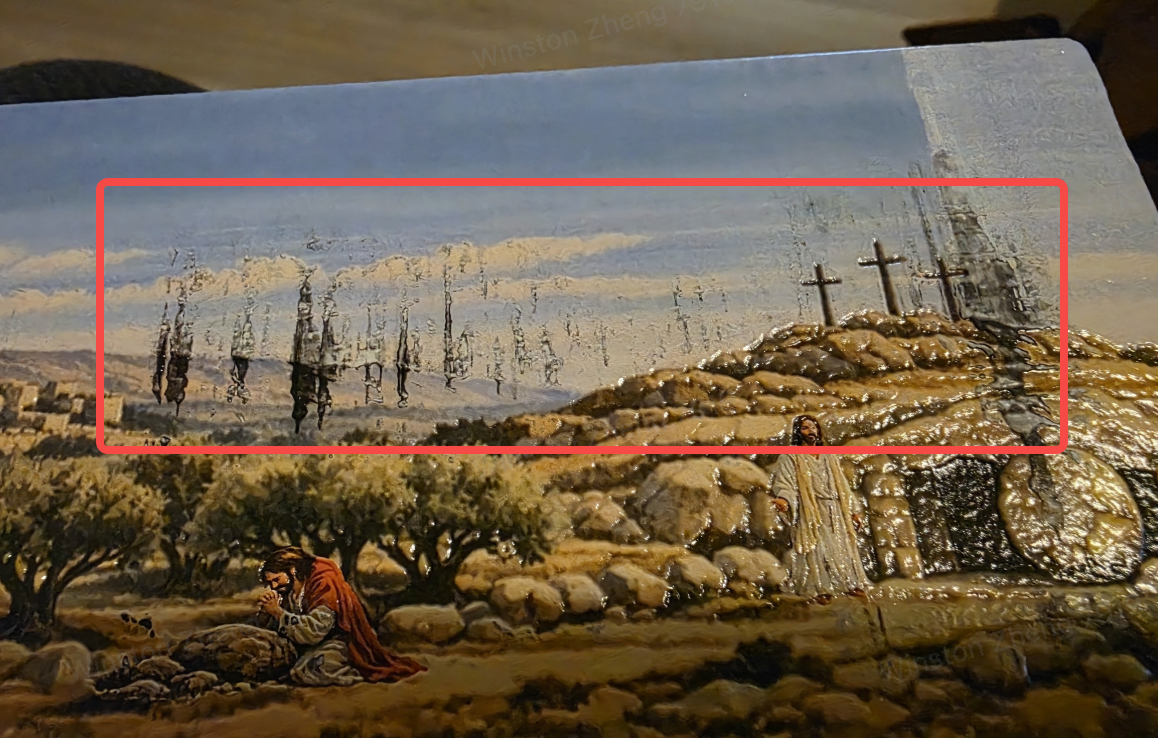
¶ Q9: Substrate Scrapes Print Head: There are black drag marks / streaks on the print. How to troubleshoot?
How to identify: Black drag marks or streaks appear on the printed surface, typically caused by the Print Head scraping against the Substrate during movement.
Basic troubleshooting steps:
- Check whether the Substrate is warped, whether there is foreign matter on the Adhesive Mat, and whether the Substrate is placed flat
- Check the Scraper condition: Has the Scraper been used for more than 6 months? → Recommend replacing the Scraper
- Return the Print Head to its original position, run Medium Cleaning + print a Test Print
- Move the Print Head out again and check the metal surface to confirm there is no further scraping
- For acrylic Substrates thinner than 3mm: printing is not recommended, as UV Curing Light exposure may cause bending and Print Head scraping
See More>> https://wiki.eufymake.com/en/Troubleshooting/Nozzle-Scraping
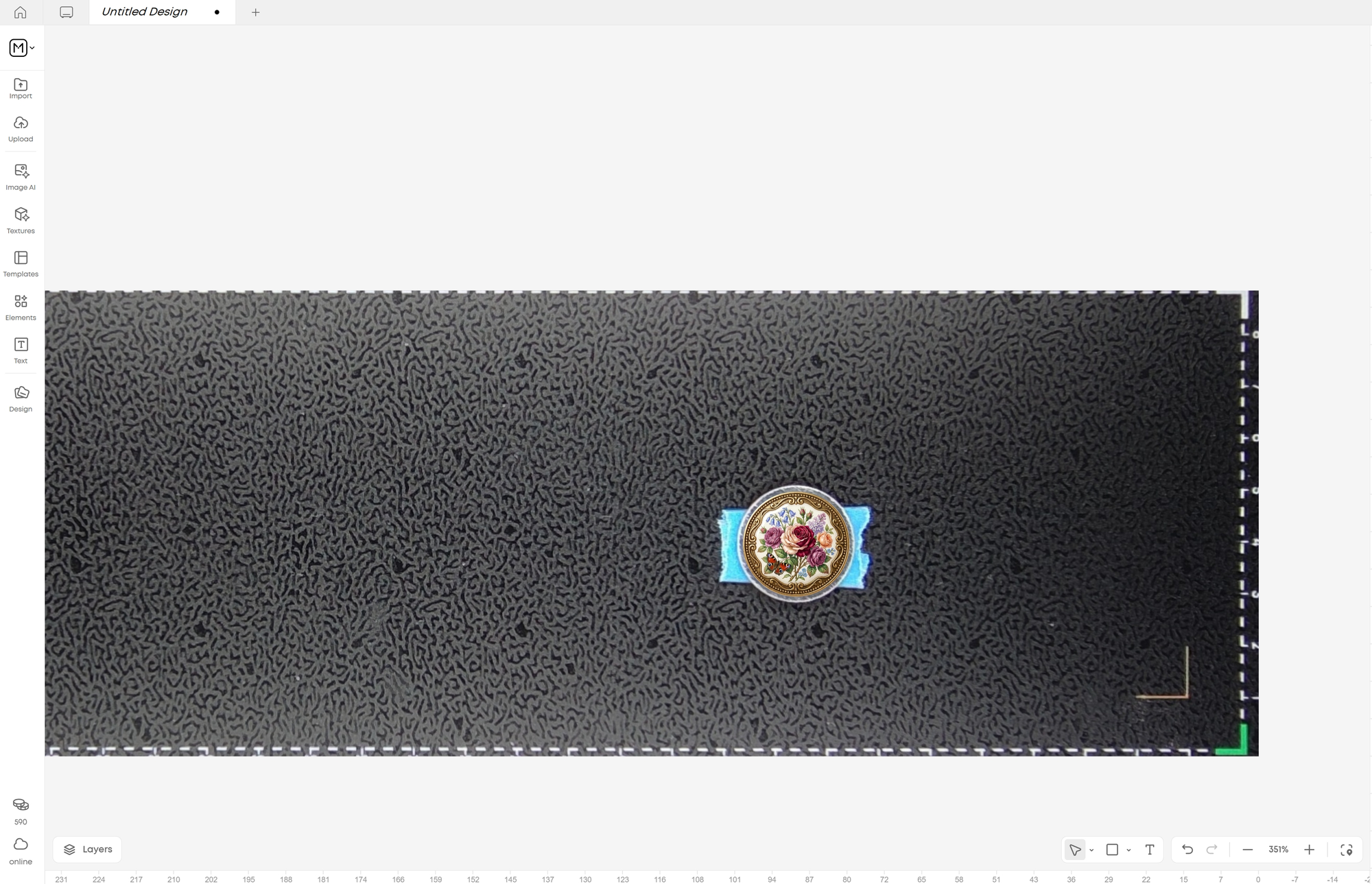
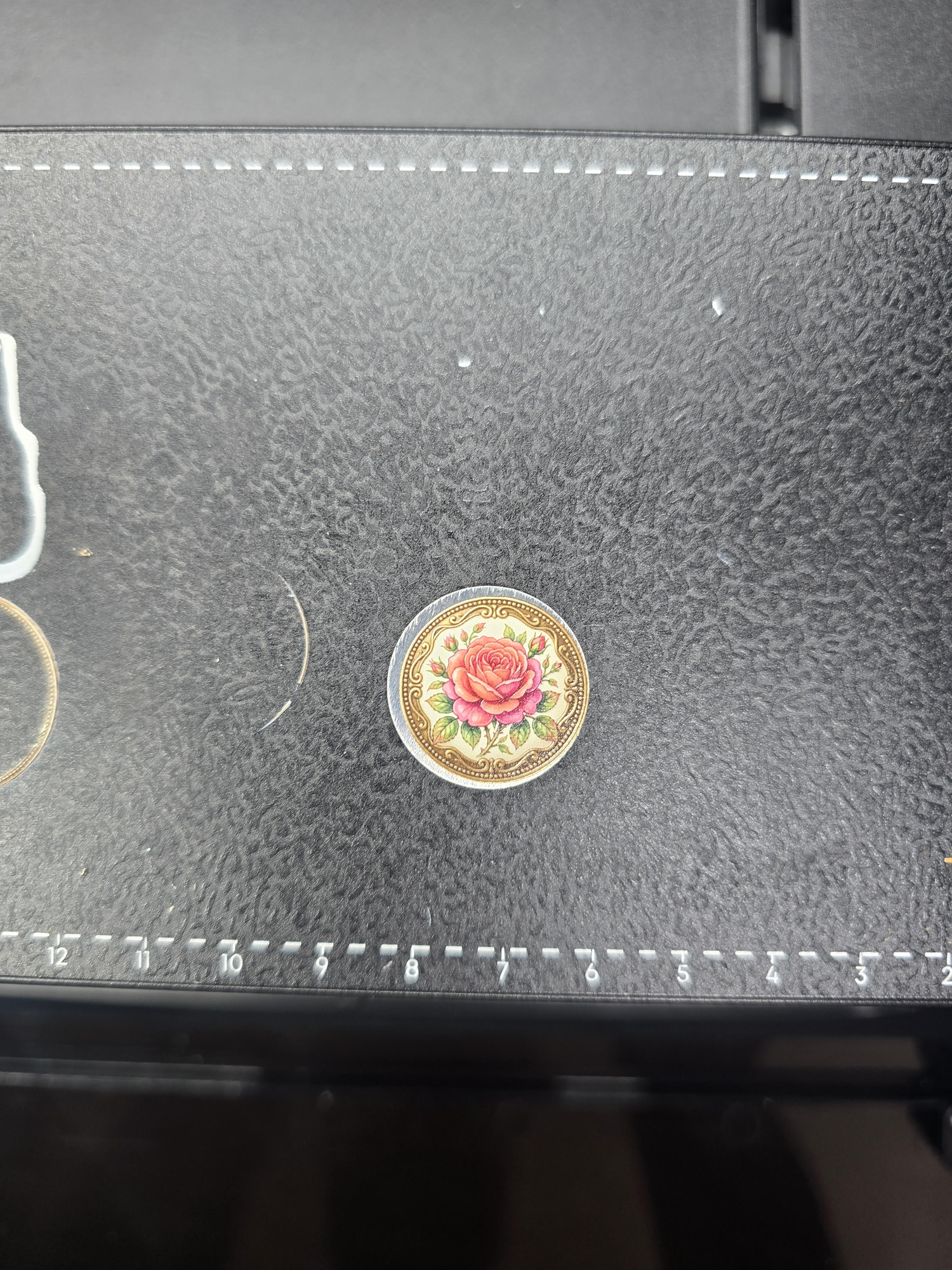
¶ Q10: The print position is shifted / pattern is misaligned. What's happening?
How to identify: The printed pattern is noticeably offset, misaligned, or inaccurately overlapped compared to the intended position.
Basic troubleshooting steps:
- Confirm the Substrate is placed stably on the Flatbed and has not moved
- Check whether the Flatbed is properly installed and the locks are securely fastened
- Perform Camera Calibration and Zero Point Calibration
- Check whether the Timing Belt is loose (if offset is in the X-axis direction): X-axis timing belt tension adjustment guide
- Confirm the Flatbed was not unlocked or shifted during the printing process
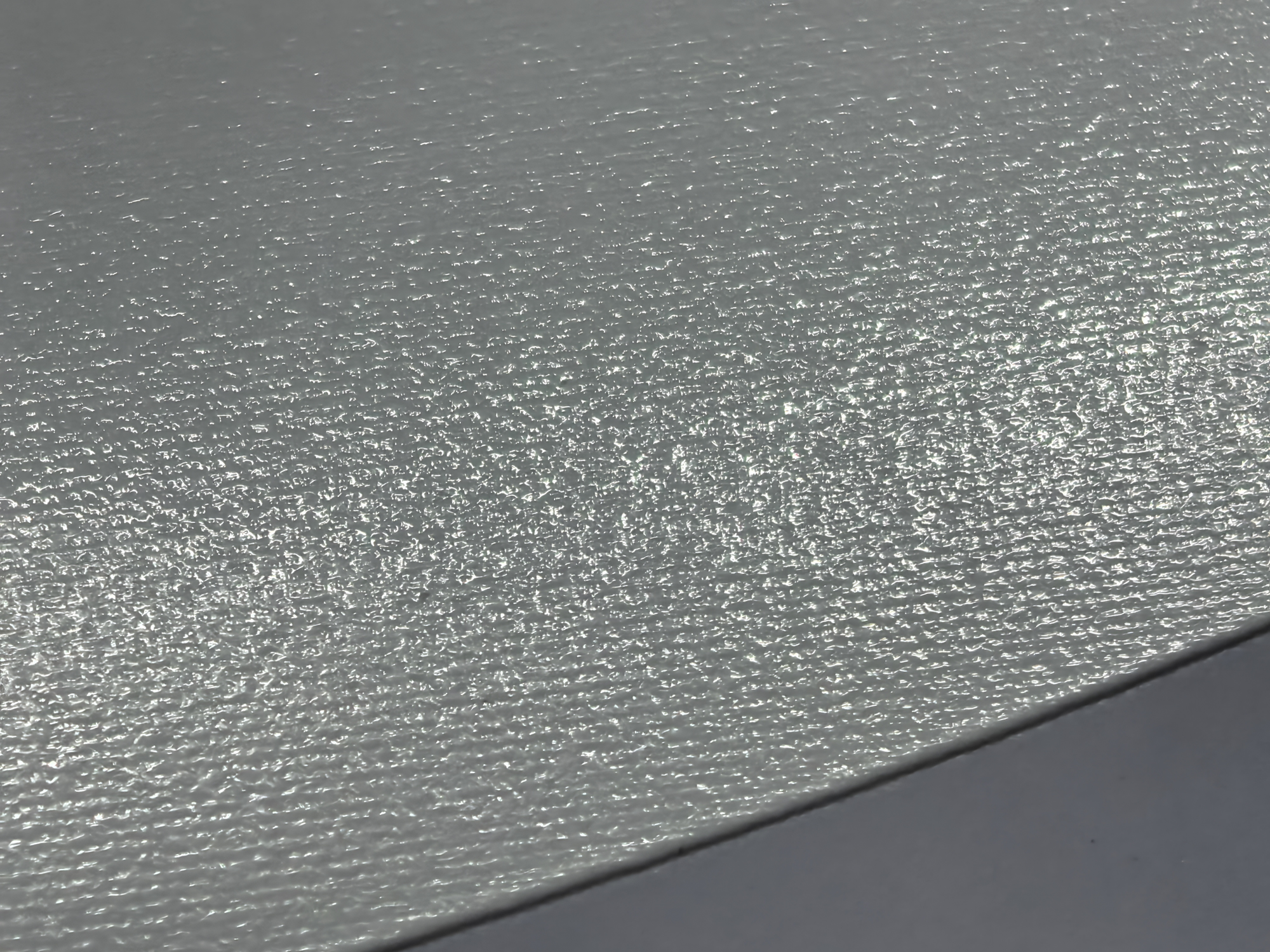
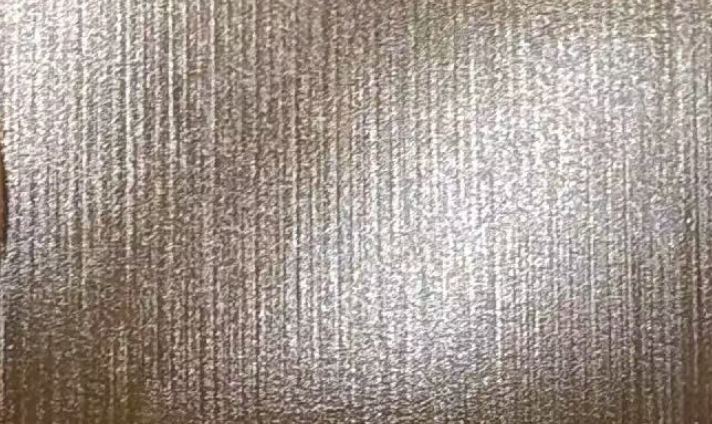
¶ Q11: Horizontal streaks / stripes appear on the print. What is the issue?
How to identify: Regular horizontal stripes appear on the printed object.
Basic troubleshooting steps:
- Is the Substrate 3D printed? → If the Substrate itself has indentations or texture, stripes may appear after printing
- Print a Test Print to check for Line Breaks (refer to Q2)
- Check the Print Head metal surface for foreign matter
- Check the Encoder strip for stains or damage
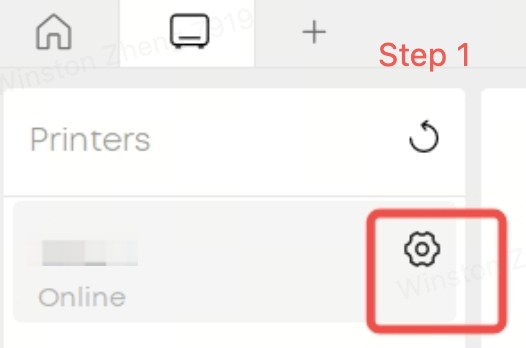
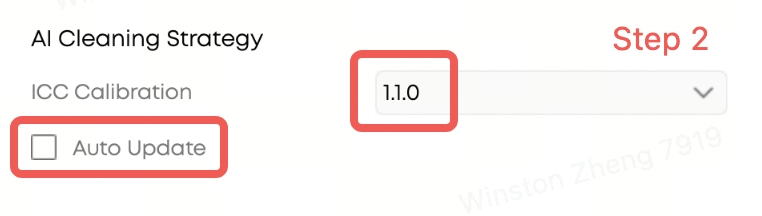
- Check the ICC version on the device settings page → ICC 1.1.5 for the European region has a known issue that may cause stripes in prints. Disable auto-update and roll back ICC to version 1.1.0
- Firmware versions prior to 3.3.8 may have a printing stripe issue. This has been fixed in later versions. If your firmware version is low, we recommend upgrading as soon as possible
- Run Medium Cleaning, then print a Test Print
¶ Complete Troubleshooting Article Index
If the quick FAQ above does not resolve your issue, please refer to the following complete troubleshooting articles:
| Issue Type | Complete Troubleshooting Article |
|---|---|
| No Ink Output / Color Shift / Line Break | Troubleshooting Guide: No Ink Output or Severe Banding https://wiki.eufymake.com/en/Troubleshooting/No-Ink-Output-or-Severe-Banding |
| White Ink Fading | White Ink Fading Troubleshooting Guide https://wiki.eufymake.com/en/Troubleshooting/white-ink-fading |
| Ink Bleeding | Solution to Ink Bleeding Problem https://wiki.eufymake.com/en/Troubleshooting/ink-bleeding |
| Ink Dripping / Splashing | Solutions to Ink Dripping or Splashing https://wiki.eufymake.com/en/Troubleshooting/Solutions-to-Ink-Dripping-or-Splashing |
| Color Mixing | Printed Image Color Mixing https://wiki.eufymake.com/en/Troubleshooting/Printed-image-color-mixing |
| Substrate Scrapes Print Head | Nozzle Scraping on the Printed Surface During Printing https://wiki.eufymake.com/en/Troubleshooting/Nozzle-Scraping |
| Insufficient Curing / Ink Not Dry | Ink is not fully dry/cured after printing https://wiki.eufymake.com/en/Troubleshooting/ink-not-dry |
| Poor Adhesion / Easy to Peel Off |
Solutions to Poor Ink Adhesion and Easy Peeling on Printed Surfaces https://wiki.eufymake.com/en/Troubleshooting/UV-Adhesion-Promoter-Prep-Pads-Solutions-to-poor-ink |
| Ghosting / Blurriness | Printed Image is Blurry or Has Ghosting https://wiki.eufymake.com/en/Troubleshooting/Printed-Image-Blurry-or-Has-Ghosting |
| Print Offset / Distortion | Printed Image Shift or Distortion https://wiki.eufymake.com/en/Troubleshooting/image-shift |
| Waste Ink Pump Error | Troubleshooting of Abnormal Waste Ink Pump Pressure Fault https://wiki.eufymake.com/en/Troubleshooting/Abnorma-waste-ink-pump-pressure-fault |
| Color Mixing After Exiting Maintenance Mode | Ink Color Mixing After Exiting Maintenance Mode https://wiki.eufymake.com/en/Troubleshooting/InkColorMixingAfterExitingMaintenanceMode |
| Sticky Surface After Exiting Maintenance Mode | After Exiting Maintenance Mode, Printed Surface Feels Sticky https://wiki.eufymake.com/en/Troubleshooting/Curing-Issues-Sticky-Surface-post-Maintenance |