¶ Operating Environment Requirements
¶ Based on the ink requirements during printer operation and the printing process, please ensure the printer is used in an appropriate environment.
- Working environment humidity : Relative humidity 20%-85%
- Working environment temperature : 15℃-35℃(59℉-95℉)
¶ Space Requirements
¶ Printer Dimensions and Weight
The basic dimensions of the printer are as follows. Please reserve enough space and ensure adequate load-bearing capacity according to these specifications.
| Product Dimensions | 595mm(W)*242mm(D)*395mm(H) |
|---|---|
| Product Weight | 15KG (up to 25 kg when loaded with ink and accessories) |
¶ Printer Placement Requirements
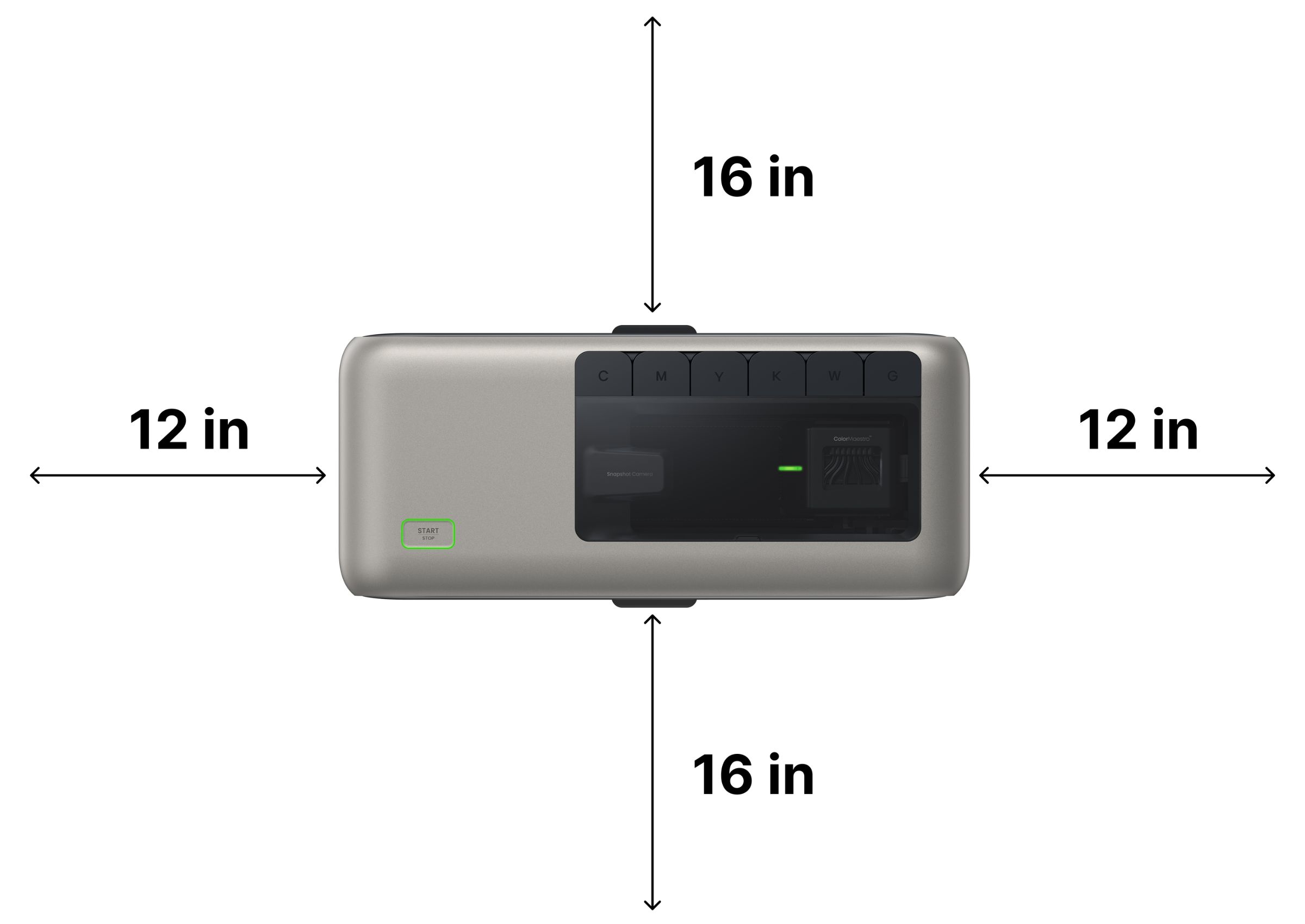
When using the standard platform board, at least 16 inches of space should be reserved both in front of and behind the printer during operation. This ensures the front door can fully open and printed materials can be handled easily. Additionally, space should be reserved on the sides:
Right side: At least 12 inches for cartridge removal and cleaning
Left side: Space required for the power cord connection Avoid placing the printer directly against walls on either side to prevent ink from contaminating the wall surface.
The tilt angle of the printer must be less than 10°.
Caution: Do not place the printer where pets or children can reach it.
¶ Handling Guide
¶ Applicable Scenarios
- Daily printer storage
- Short-distance transportation, including road transport and air consignment
- Product returns, exchanges, and repair shipments
¶ Operation SOP
- Press and hold the power button for more than 5 seconds. The device will enter maintenance mode, which takes approximately 15 minutes to complete.
- After maintenance is complete, the Start/Stop button will flash blue. At this point, the power supply can be disconnected.
- Remove the six ink cartridges one by one, then remove the cleaning cartridge.
- Install the protective caps on the three connectors inside the cleaning cartridge compartment, or wrap the connectors with a soft cloth.
- Open the top cover and manually move the print head to confirm that it is locked onto the ink station.
- Close the top cover, then use a soft cloth or removable tape to cover the ink cartridge compartment to prevent dust from entering.
- Place the entire machine back into its packaging.
- When ready to use the printer again, unpack the machine, connect the power supply, and reinstall the ink cartridges and cleaning cartridge following the first-time setup procedure.
¶ Precautions
- Always use the original printer packaging and ensure the machine is securely fixed inside the box.
- After transportation, remove the printer from the packaging as soon as possible and perform a print test. Camera recalibration after transport is recommended.
- If ink cartridges must be transported at the same time, place them in the self-sealing bags included with the cartridge packaging. Opened cartridges may leak during strong vibration and should not be exposed to severe transport conditions.