¶ Enter Make It Real → View Projects → Open a Project
Q1: What is VibeMake? How is it different from just editing someone's design?
VibeMake is an AI-assisted remixing experience — fundamentally different from downloading a Design File:
- VibeMake: You start from the original AI Prompt, tweak a few keywords, and AI generates a brand-new design in your own style — the result is uniquely yours, not a copy
- Customizing a Design File: You get the creator's original editable file and print it exactly as-is
¶ View Project Detail Page
Q2: I can't see the AI Prompt or Ink Usage on the detail page. Is this project incomplete?
It's not a bug — the creator just hasn't added it yet.
Print parameters need to be entered manually by the creator during publishing, or auto-extracted via AI. Older projects published before this feature launched may have empty fields.
⚠️ Empty fields = creator didn't fill them in. Feel free to ask in the comments.
Q3: What does the license mean? Can I sell something I printed after VibeMake?
The license you select applies to your Design File — it governs what others may do when they open it via Edit & Use.
VibeMake is outside the scope of the license. As long as a project has an AI Prompt, the platform authorizes other users to create VibeMake derivatives, regardless of which license the original creator chose. The copyright of a VibeMake-generated design belongs to the user who created it, who may freely determine whether to use it commercially.
The following licenses apply to Design File usage only:
| License | Remix? | Commercial? | Attribution required? |
|---|---|---|---|
| Public Domain (CC0) | ✓ | ✓ | No |
| CC-BY | ✓ | ✓ | ✓ |
| CC-BY-SA | ✓ same license required | ✓ | ✓ |
| CC-BY-NC | ✓ | No | ✓ |
| CC-BY-NC-SA | ✓ same license, non-commercial only | No | ✓ |
| CC-BY-ND | No | ✓ | ✓ |
| CC-BY-NC-ND | No | No | ✓ |
| SDFL | No | No | No |
⚠️ "Remix" in the table refers to modifying a Design File via Edit & Use — not to VibeMake derivatives. The "No Derivatives" restriction in CC-BY-ND and SDFL applies solely to Design Files; it does not restrict VibeMake.
💡 VibeMake derivatives automatically credit the original creator.
Q4: The detail page has both "Vibemake" and "Edit & Use" — which should I click? What's the difference?
- VibeMake (green primary button): AI-assisted design generation. An input panel appears where you can modify keywords from the original AI Prompt or upload a reference image, and AI generates a new design for you. Recommended for first-time users.
- Edit & Use (secondary button): Opens the creator's editable Design File directly in the editor, where you can manually adjust layers, colors, and more. Best for users with design experience who want precise control. Note: this requires the creator to have uploaded a Design File — if they haven't, the button will be grayed out.
💡 First time? Start with VibeMake — it's more guided and beginner-friendly.
¶ Click VibeMake → Enter Image AI
Q5: After clicking VibeMake, the page jumped or opened a new tab. Is that normal?
Completely normal — this is the intended flow:
- Step 1: An input panel appears on the current page, showing the original AI Prompt with suggested keywords highlighted
- Step 2: Edit the Prompt or press Enter to confirm as-is
- Step 3: The page opens the eufyMake Studio editor in a new tab, where you'll find the Image AI interface
- Step 4: Continue chatting with Image AI to refine the design until you're happy
⚠️ There are about 4 steps total. Don't close the page when it redirects — that's expected, not an error.
Q6: Does VibeMake cost money? What are AI Credits?
VibeMake uses an AI Credits system:
- Each generated image costs 5 AI Credits
- Accounts with a linked eufyMake device receive 600 AI Credits to start (enough for 120 images)
- You can get more AI Credits when yours run out
💡 Refine your Prompt before generating to avoid wasting credits.
Q7: How do I edit the Prompt? Which words should I change?
The VibeMake panel automatically highlights suggested keywords (pet type, color style, pattern theme, etc.) — you don't need to understand the full Prompt from scratch.
Common edits:
- Change
golden retrievertoorange cat→ pattern shifts from a golden retriever to an orange cat - Change
holographic foiltomatte black→ style shifts from iridescent to matte black - Change
floral patterntogeometric pattern→ switches from floral to geometric
💡 Only edit the highlighted words and leave the rest unchanged — that's the safest approach.
Q8: Where can I see the Ink Usage and Print Time after printing? Do I need to enter them manually when publishing?
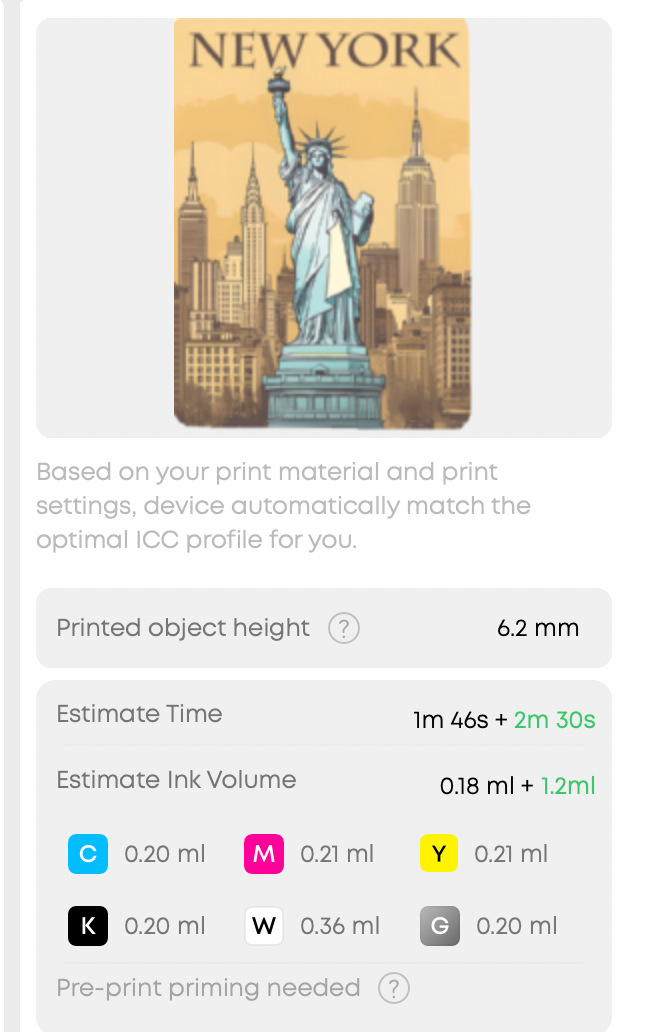
The Print Completed screen shows the full CMYKWG channel Ink Usage and Print Time for your print job. These numbers won't auto-fill into the publish page for now, so you'll need to record them manually:
- After printing, take a screenshot of the Print Completed screen first
- Then click「Publish」and manually enter the values using your screenshot as reference
⚠️ If you close the Print Completed screen first, this data will be very hard to retrieve. Taking a screenshot is the simplest solution right now.
¶ Publish Page → Done
Q9: The publish page is asking me to upload a design image in the AI Prompt section — what is that? Is it different from my product photos?
Yes — design image ≠ product photo. They're uploaded in different places:
- Top image upload area: Upload real photos of your printed item (product shots, scene photos)
- 「+」button next to the AI Prompt field: Upload the design image you generated in Image AI (not a photo of the physical item)
Once uploaded, the system reads the image and auto-fills the AI Prompt field — no typing needed.
💡 Design image = the image AI generated for you; project photo = a photo of your physical printed item. These are two completely different things.
Q10: Is the license field required? What should I choose?
License is required — you cannot publish without selecting one.
Note: the license you choose governs your Design File — it determines what others may do when they open it via Edit & Use. It does not apply to VibeMake: as long as your project has an AI Prompt, others may create Vibemake derivatives regardless of your license choice.
Quick guide:
- No restrictions — anyone may use it freely → Public Domain (CC0)
- Modification and commercial use permitted, with attribution → CC-BY (most common)
- Modification permitted, no commercial use, with attribution → CC-BY-NC
- Modification permitted, no commercial use, same license required, with attribution → CC-BY-NC-SA
- Commercial use permitted, no modification, with attribution → CC-BY-ND
- Personal viewing and printing only — no modification or commercial use → SDFL
The page also includes a "How to Select a License?" guide — answer 2 questions to receive a recommendation.
💡 Most creators choose CC-BY: it permits others to modify and commercially use your Design File, while requiring attribution.
Q11: Can I use my VibeMake design commercially? Does it matter if the original creator chose a non-commercial or no-derivatives license?
No, it does not affect you. The license applies to the Design File, not to VibeMake derivatives.
- Regardless of the original creator's license — including CC-BY-NC, CC-BY-ND, or SDFL — the copyright of your VibeMake-generated design belongs to you. You may determine independently whether to use it commercially.
- VibeMake is a derivative act authorized by the platform based on an AI Prompt. It is not governed by the original creator's license terms.
- If you upload a reference image during VibeMake, its use is equally outside the scope of the original creator's license. We recommend using images you created or have the right to use.
⚠️ While your VibeMake design is not restricted by the original creator's license, you remain responsible for ensuring your design does not incorporate third-party copyrighted elements — such as specific IP characters or brand identifiers — before any commercial use.